Products
Pitbull Secure Gateway Advanced Threat & Quarantine Outbound Filtering Smarthost SMTP Relay Features Release Notes Platform Security AnalysisSolutions
Hosting & ISP Banks & Financial Services Universities & Education ESP & High Volume Enterprise IT MSP & Reseller All Solutions CompatibilityCompany
About Us Why Pitbull? Contact Our Data Center Roadmap Compare Privacy Policy Terms of Use Service Level Agreement KVKK Policy GDPR PolicyThe same 4-step model applies to all mail servers and panels.
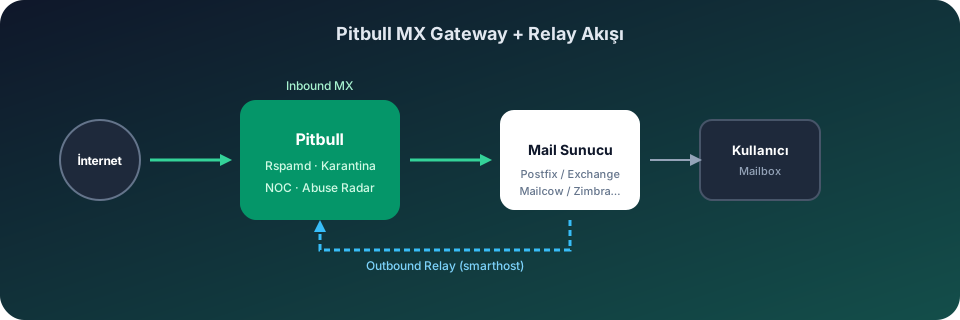
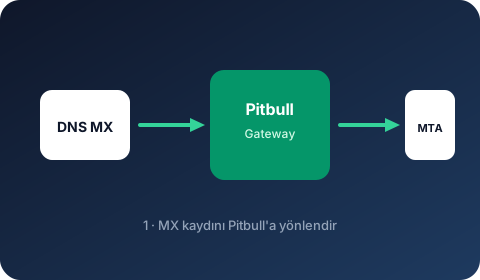
Point DNS MX to the Pitbull gateway. Inbound traffic passes through Rspamd filtering.
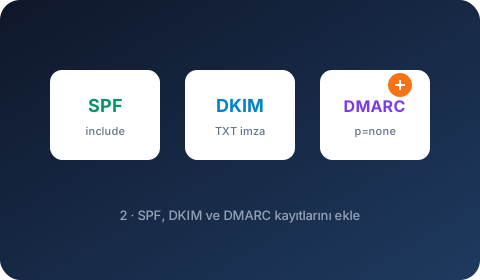
Add authentication records. Start with SPF include, DKIM signing and DMARC p=none.
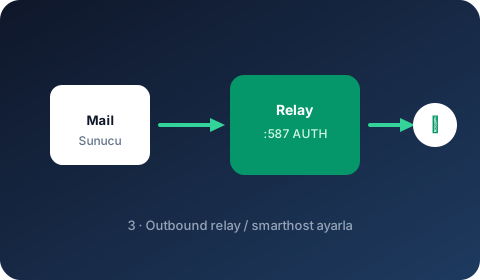
Set Pitbull relay as smarthost / relayhost on your mail server.
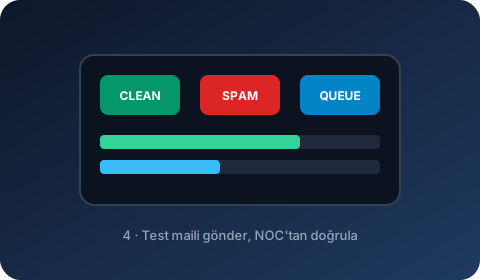
Send a test email and monitor queue, rejects and delivery in the NOC panel.
Direct compatibility with popular hosting control panels.
MX gateway and outbound smarthost integration on Exim-based cPanel servers.
Illustrated integration guide →Central filtering and quarantine layer on Plesk Postfix/Qmail environments.
Illustrated integration guide →Zero-load antispam offload model on lightweight DirectAdmin servers.
Illustrated integration guide →MX gateway integration on OpenLiteSpeed/Postfix-based CyberPanel servers.
Illustrated integration guide →Antispam offload for lightweight hosting on HestiaCP Exim environments.
Illustrated integration guide →Centralized Postfix gateway for multi-server ISPConfig setups.
Illustrated integration guide →MX and relayhost configuration on Webmin/Virtualmin Postfix servers.
Illustrated integration guide →Fast MX gateway setup on aaPanel Postfix hosting servers.
Illustrated integration guide →Postfix gateway layer on open-source Froxlor ISP panels.
Illustrated integration guide →Enterprise MX gateway for InterWorx cluster and reseller environments.
Illustrated integration guide →Postfix smarthost integration on the Enhance modern hosting platform.
Illustrated integration guide →Free and commercial mail servers: Mailcow, MailEnable, Exchange, Zimbra, Postfix and more.
Bare-metal Postfix integration via transport map and relayhost.
Illustrated integration guide →ISP/hosting MTA support via Exim smarthost and ACL-based routing.
Illustrated integration guide →Mailertable and smart_host relay integration on classic Sendmail MTA.
Illustrated integration guide →Relay via and MX inbound configuration with BSD-based OpenSMTPD.
Illustrated integration guide →Gateway integration via Qmail smtproutes and MX routing.
Illustrated integration guide →Outbound hook and relay configuration on Node.js-based Haraka MTA.
Illustrated integration guide →Relay_host and MX gateway integration on Zimbra Postfix layer.
Illustrated integration guide →Windows hMailServer SMTP relay route and inbound MX gateway.
Illustrated integration guide →MDaemon Smart Host and gateway domain configuration.
Illustrated integration guide →Kerio Connect SMTP relay server and inbound gateway setup.
Illustrated integration guide →SmarterMail outgoing gateway and smarthost relay configuration.
Illustrated integration guide →Axigen relay host and MX-based inbound/outbound gateway.
Illustrated integration guide →IceWarp SMTP relay and domain gateway configuration.
Illustrated integration guide →Windows MailEnable SMTP smart host and inbound MX gateway.
Illustrated integration guide →Relayhost and MX gateway on Docker-based Mailcow (Postfix).
Illustrated integration guide →Relayhost and MX integration on iRedMail Postfix/OpenLDAP.
Illustrated integration guide →Gateway setup via Modoboa web UI and Postfix relayhost.
Illustrated integration guide →Outbound relay and MX gateway on modern Stalwart Mail Server.
Illustrated integration guide →On-prem Exchange send connector and MX gateway integration.
Illustrated integration guide →CommuniGate Pro SMTP relay and inbound gateway configuration.
Illustrated integration guide →Relay host integration on Zextras Carbonio Postfix layer.
Illustrated integration guide →Cloud and enterprise mail environments.
Billing and operations automation.
Setup takes 3-5 minutes in most environments. DNS propagation may take additional time.
Reach us: 0850 500 0 666
Find detailed integration info on product pages.