Compatibility

Full MX gateway and relay server compatibility with cPanel, Plesk, DirectAdmin and other hosting panels; Postfix, Exim, Mailcow, MailEnable, Exchange, Zimbra, iRedMail, Modoboa and dozens of free/commercial mail servers. Route inbound and outbound traffic through Pitbull in minutes.

Uyumluluk MX · API
cPanel
Exim
Postfix
MTA
M365
Hybrid
WHMCS
Billing
MX → PitbullOK
SPF / DKIMOK
Outbound relayON
34+
Platform integrations
3-5 min
MX setup time
Inbound
Inbound filtering
Outbound
Outbound protection

Illustrated setup guide

The same 4-step model applies to all mail servers and panels.

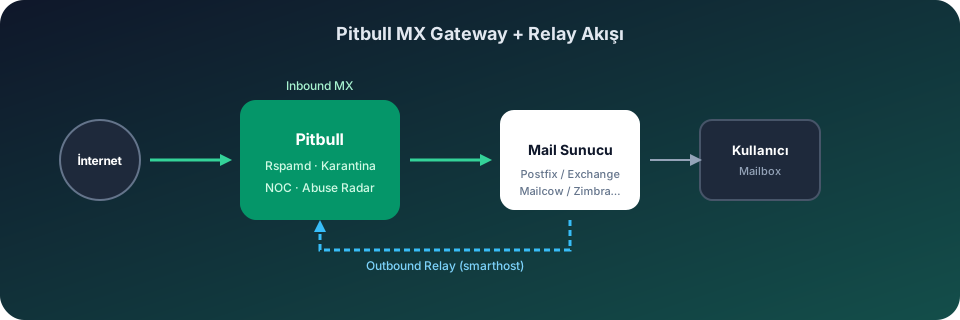
Pitbull MX Gateway and Relay flow
MX Gateway
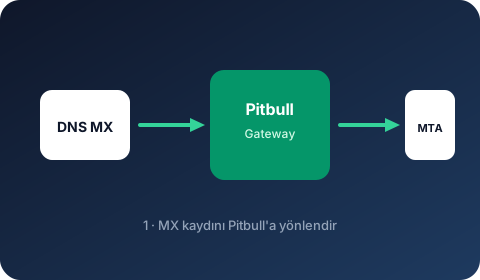
1

MX Gateway

Point DNS MX to the Pitbull gateway. Inbound traffic passes through Rspamd filtering.

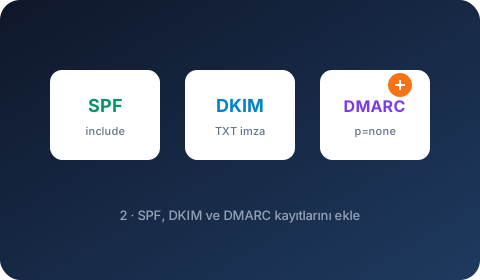
SPF · DKIM · DMARC
2

SPF · DKIM · DMARC

Add authentication records. Start with SPF include, DKIM signing and DMARC p=none.

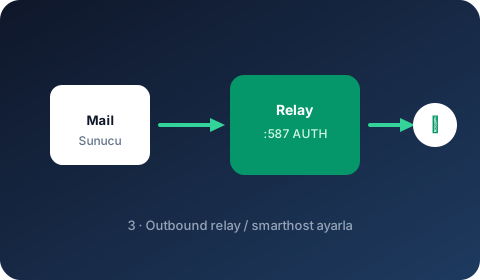
Outbound Relay
3

Outbound Relay

Set Pitbull relay as smarthost / relayhost on your mail server.

NOC Verification
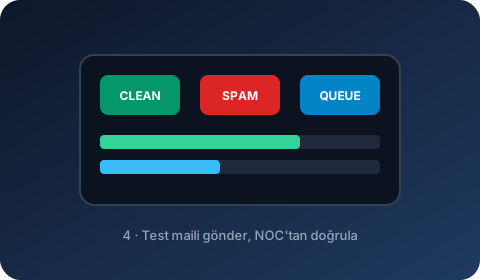
4

NOC Verification

Send a test email and monitor queue, rejects and delivery in the NOC panel.

Mail Servers (MTA)

Free and commercial mail servers: Mailcow, MailEnable, Exchange, Zimbra, Postfix and more.

Postfix

Free

Bare-metal Postfix integration via transport map and relayhost.

Illustrated integration guide →

Exim

Free

ISP/hosting MTA support via Exim smarthost and ACL-based routing.

Illustrated integration guide →

Sendmail

Free

Mailertable and smart_host relay integration on classic Sendmail MTA.

Illustrated integration guide →

OpenSMTPD

Free

Relay via and MX inbound configuration with BSD-based OpenSMTPD.

Illustrated integration guide →

Qmail

Free

Gateway integration via Qmail smtproutes and MX routing.

Illustrated integration guide →

Haraka

Free

Outbound hook and relay configuration on Node.js-based Haraka MTA.

Illustrated integration guide →

Zimbra

Free / Commercial

Relay_host and MX gateway integration on Zimbra Postfix layer.

Illustrated integration guide →

hMailServer

Free

Windows hMailServer SMTP relay route and inbound MX gateway.

Illustrated integration guide →

MDaemon

Commercial

MDaemon Smart Host and gateway domain configuration.

Illustrated integration guide →

Kerio Connect

Commercial

Kerio Connect SMTP relay server and inbound gateway setup.

Illustrated integration guide →

SmarterMail

Commercial

SmarterMail outgoing gateway and smarthost relay configuration.

Illustrated integration guide →

Axigen

Commercial

Axigen relay host and MX-based inbound/outbound gateway.

Illustrated integration guide →

IceWarp

Commercial

IceWarp SMTP relay and domain gateway configuration.

Illustrated integration guide →

MailEnable

Free / Commercial

Windows MailEnable SMTP smart host and inbound MX gateway.

Illustrated integration guide →

Mailcow

Free

Relayhost and MX gateway on Docker-based Mailcow (Postfix).

Illustrated integration guide →

iRedMail

Free / Commercial

Relayhost and MX integration on iRedMail Postfix/OpenLDAP.

Illustrated integration guide →

Modoboa

Free

Gateway setup via Modoboa web UI and Postfix relayhost.

Illustrated integration guide →

Stalwart

Free

Outbound relay and MX gateway on modern Stalwart Mail Server.

Illustrated integration guide →

Microsoft Exchange

Commercial

On-prem Exchange send connector and MX gateway integration.

Illustrated integration guide →

CommuniGate Pro

Commercial

CommuniGate Pro SMTP relay and inbound gateway configuration.

Illustrated integration guide →

Carbonio

Commercial

Relay host integration on Zextras Carbonio Postfix layer.

Illustrated integration guide →

Setup in 5 Steps

Setup takes 3-5 minutes in most environments. DNS propagation may take additional time.

  1. 1 Point MX records to the Pitbull gateway address (priority 10).
  2. 2 Add Pitbull include to SPF — without breaking existing records.
  3. 3 Enable DKIM signing in the panel and add TXT to DNS.
  4. 4 Start DMARC at p=none and monitor reports.
  5. 5 Add Pitbull address to smarthost/relayhost for outbound.
  6. 6 Send a test email and verify traffic in the NOC panel.

Reach us: 0850 500 0 666